Membership Plans
Set what members pay, how often, and which classes they can come to.
A membership plan is what a member signs up to: a price, how often it's charged, and the classes it covers. Most clubs have a few, for example a junior plan, an adult plan, a family plan and a one-off drop-in.
Open them from the sidebar: Membership Plans.
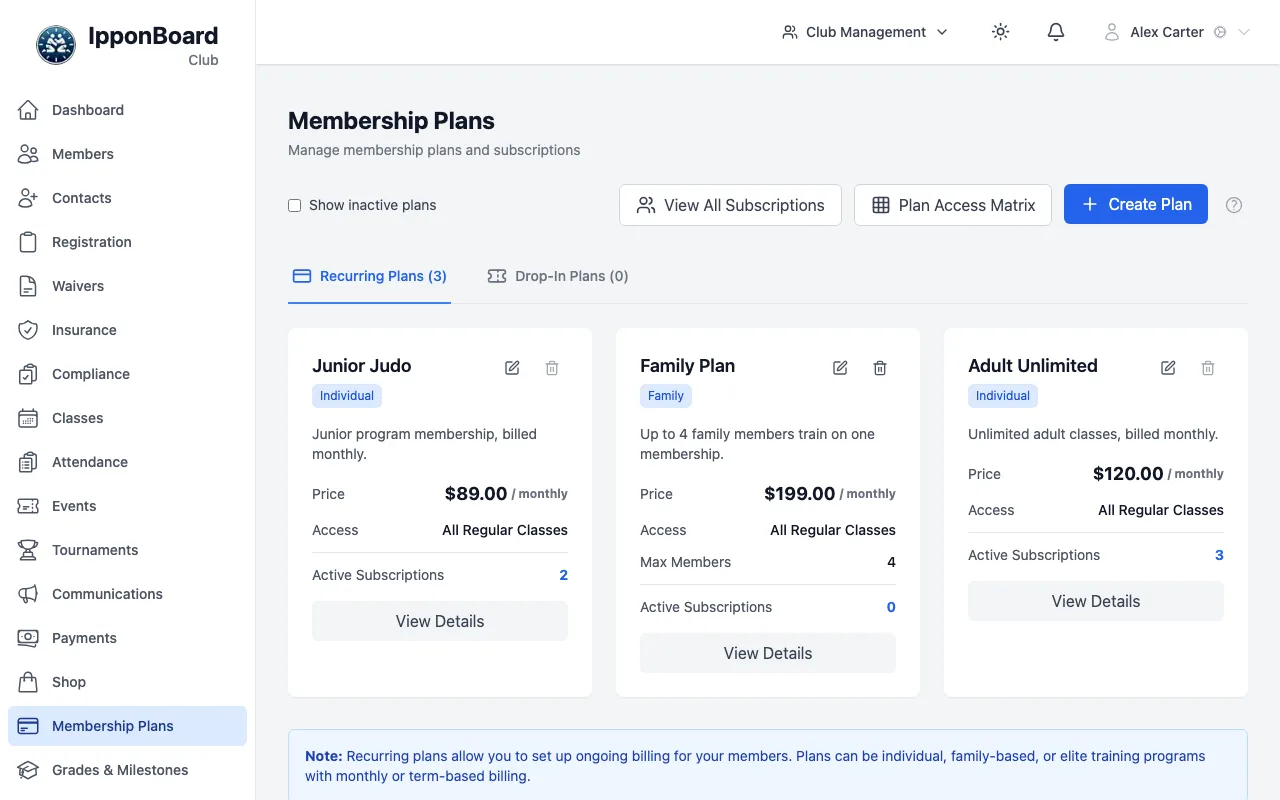
What's on the page
- Two tabs: Recurring Plans (monthly, term-based and fixed-length plans) and Drop-In Plans (one-time purchases). Each tab shows how many plans it has.
- Each plan card shows its price, its Access (which classes it covers) and, for recurring plans, Active Subscriptions. Drop-in plans show Total Sales instead. View Details opens the plan.
- Show inactive plans also lists plans you've turned off. They appear faded with an Inactive label.
- View All Subscriptions lists every member's subscription across all plans.
- Plan Access Matrix shows every plan against every class in one grid.
- Create Plan starts a new plan. The pencil and bin buttons on a card edit or turn off that plan.
Who can change plans
Owners and managers can create, edit, turn off and delete plans, and add members to a plan by hand. Coaches and front-desk (transactional) staff can open the page and see the plans, but not change them; the Create Plan, edit and bin buttons don't show for them. See Roles and permissions.
Guides
Creating and managing plans
Make a plan, change it, add a member to it by hand, and turn it off.
Plan types and billing
Individual, Family, Elite and Custom plans; monthly, term, fixed-length and one-time billing.
Pricing
The price, family extras, class limits, and what happens when you change a price.
Class access and the access matrix
Which classes each plan covers, and the grid that shows it at a glance.