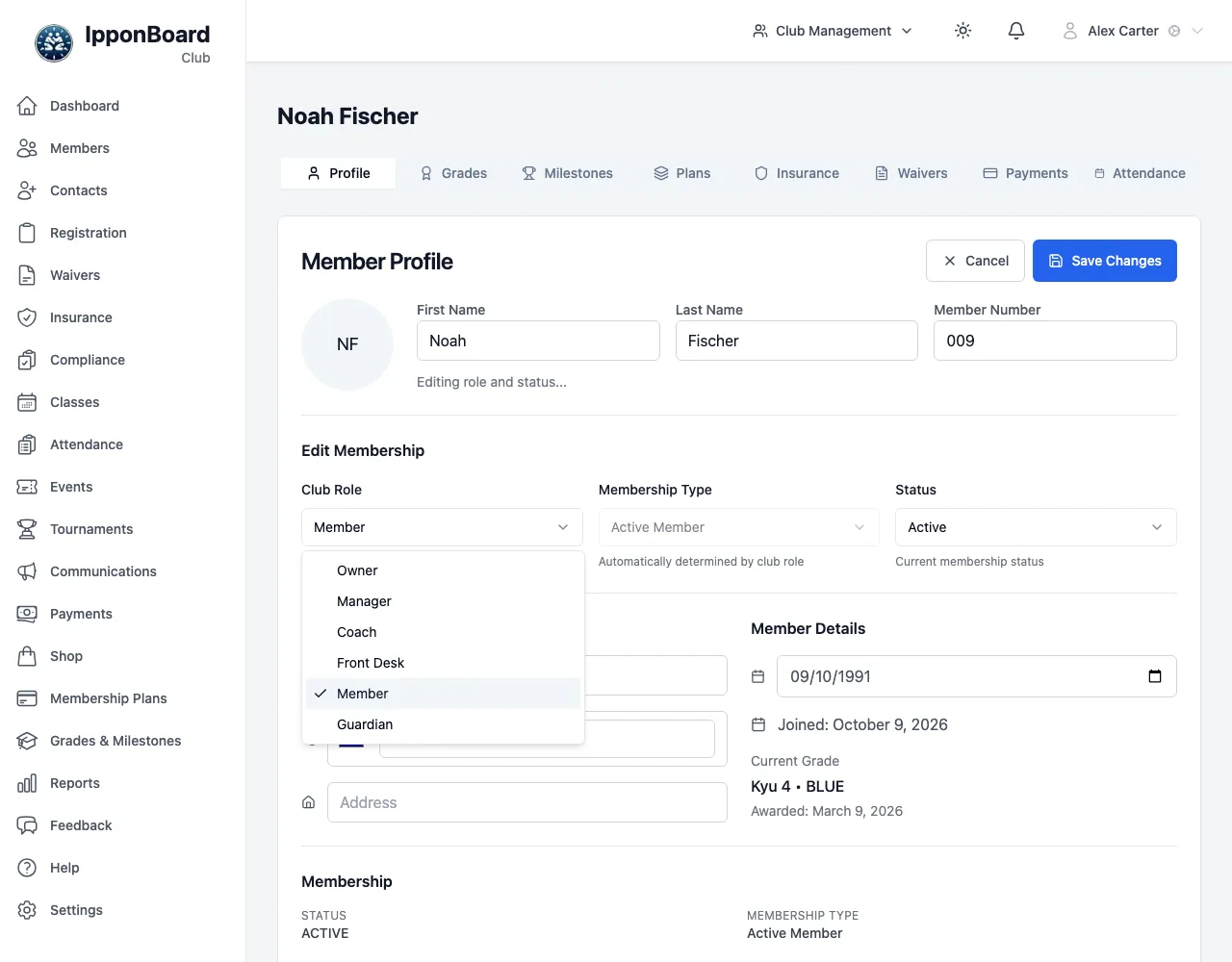
Roles & Permissions
What owners, managers, coaches, front-desk accounts and members can see and do.
Everyone at your club has one role. The role decides which menus they see in the sidebar and what they're allowed to change. Most people are members; your staff are owners, managers or coaches.
The roles
Owner
Everything, including changing the club’s IpponBoard subscription (Platform Billing) and payment provider, and making other people owners or managers.
Manager
Runs the club day to day: members, payments, the registration form, communications, reports and settings, including what coaches can do. Sees Platform Billing and the payment provider but can’t change them. Can’t make someone an owner or manager, or change another manager or owner.
Coach
Classes, attendance, members and grading. Can view and add members, award grades and link families, but can’t edit or delete members. Payments and reports as your club allows (What coaches can do, below).
Transactional
The front desk: a person given Front Desk in the Club Role list, or a shared kiosk login made in Staff & Devices. Check-ins, adding members, taking payments and shop sales. No settings, reports or financial figures on the dashboard.
Member
Someone who trains. Uses the member portal and My Account only, not the club management screens.
Guardian
A guardian-only parent. Same access as a member, plus looking after their children.
Who can do what
| Task | Owner | Manager | Coach | Transactional |
|---|---|---|---|---|
| View members and profiles | ✓ | ✓ | ✓ | ✓ |
| Add members (registration wizard) | ✓ | ✓ | ✓ | ✓ |
| Edit or delete members, change roles | ✓ | ✓ | – | – |
| Turn on logins, resend setup or reset emails | ✓ | ✓ | ✓ | – |
| Link guardians and dependants | ✓ | ✓ | ✓ | – |
| Award grades | ✓ | ✓ | ✓ | – |
| Review registration submissions | ✓ | ✓ | – | – |
| Configure the registration form | ✓ | ✓ | – | – |
| Take payments (Process Payment) | ✓ | ✓ | club setting | ✓ |
| See payment history | ✓ | ✓ | club setting | ✓ |
| Refund a payment | ✓ | ✓ | – | – |
| Reports | ✓ | ✓ | club setting | – |
| Communications and Settings | ✓ | ✓ | – | – |
| Decide what coaches can do | ✓ | ✓ | – | – |
| Create front-desk accounts | ✓ | ✓ | – | – |
| See Payment Provider and Platform Billing | ✓ | ✓ | – | – |
| Pair Square Terminals | ✓ | ✓ | – | – |
| Change the payment provider or Platform Billing | ✓ | – | – | – |
Sidebar menus by role
- Transactional: Dashboard, Members, Contacts, Registration, Waivers, Insurance, Compliance, Classes, Attendance, Events, Payments, Shop, Membership Plans, Grades & Milestones.
- Coach: All of the above, plus Feedback, and Reports when your club lets coaches see reports (Payments is hidden if they can neither take payments nor see any history).
- Manager and Owner: All of the above, plus Communications, Reports, Help, Settings (and Tournaments, if your club has it).
Some pages in a menu are view-only for lower roles. For example, front-desk accounts can see Membership Plans and Grades & Milestones but not change them.
What coaches can do
Each club decides how much its coaches see of the money side. An owner or manager sets it in Settings → Staff & Devices → What coaches can do. Owners and managers can always do all of it, and front-desk accounts aren't affected.
- Take payments (on by default): Process Payment with cash, card, a saved card, Square or an invoice. Refunds stay with owners and managers.
- See payment history: Off, Last 30 days (the default), Last 90 days or All. It covers the Payments page, its export and a member's payments; a coach can still take a payment with it off.
- See reports: Off, Attendance only (the default), Attendance & membership or Everything (adds Financial and the full club report).
Changing someone's role
Open their profile
Sidebar Members → click the person.
Edit
On the Profile tab, click Edit Profile. An Edit Membership section appears.
Pick the role
Choose from Club Role: Owner, Manager, Coach, Front Desk, Member or Guardian. The list only offers the roles you're allowed to give.
Save
Click Save Changes. The new role applies straight away.