Class access and the access matrix
Which classes each plan covers, and the grid that shows it at a glance.
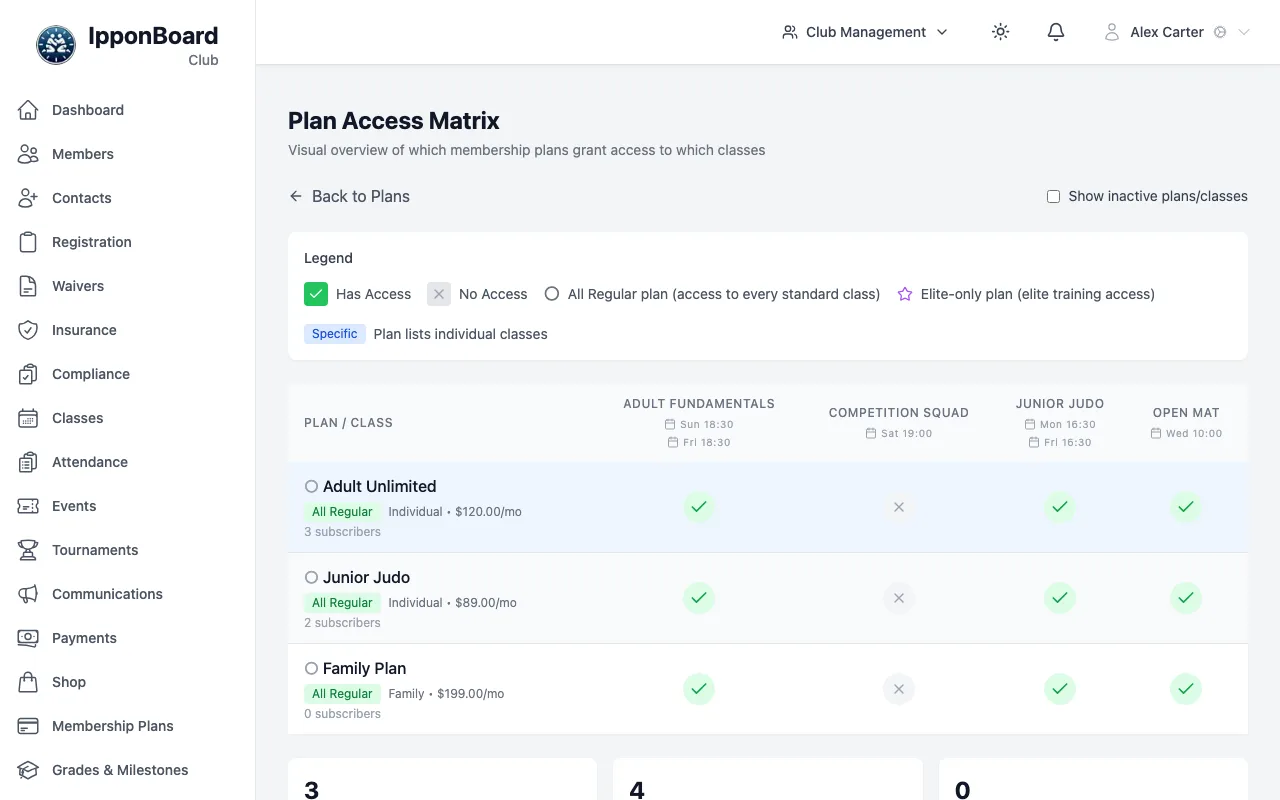
A plan covers a class in one of two ways: by the class's category, or because you picked that class on the plan. The Plan Access Matrix shows the result for every plan and class at once.
How a plan covers a class
- Every class has an Access Category: General, Elite or Other. You set it when you create or edit the class.
- On the plan, Auto-include all GENERAL classes covers every General class, including ones you add later. Auto-include all ELITE classes does the same for Elite classes.
- Additional Specific Classes on the plan covers the classes you tick, whatever their category. Other classes are only covered this way.
Change which classes a plan covers
Open the plan
In Membership Plans, click the pencil on the plan, or Edit Plan Access on its page.
Tick the classes
Under Class Access, tick the categories and any specific classes.
Save
Click Save Changes.
To move a class into or out of a category, edit the class and change its Access Category instead. See Creating classes.
The access matrix
In Membership Plans, click Plan Access Matrix. You can also reach it from Manage Plan Access on a class or in the class form.
- Each row is a plan, with its price and number of subscribers.
- Each column is a class, with its days and start times.
- A green tick means the plan covers the class; point at it to see why. A grey cross means it doesn't.
- Click a plan or class name to open it. Show inactive plans/classes adds the ones you've turned off.
The matrix is for checking only. To change a tick, edit the plan or the class.
Members-only classes
Each class is also set to Open to all or Members only under Class Access in the class form. A members-only class needs an active plan that covers it. An open class also takes drop-in visitors; to charge them, make a One-time plan that covers the class.