Guardians and Dependants
Link parents and children, add a second guardian, and choose the primary guardian.
A guardian is a parent or carer who looks after a junior member. The junior is their dependant. One guardian can have several children, and a child can have more than one guardian (for example both parents). One of them is the primary guardian.
A guardian can also train at the club (an active member) or be Guardian Only: they manage their children but don't appear in class attendance.
Where you'll see them
Open a member's profile (sidebar Members → click the member) and scroll down the Profile tab. The section is called Dependants, Guardians, Dependants & Guardians or Family, depending on who's linked. It also shows Co-Guardians (the other guardians of the same children) and Co-Dependants (brothers and sisters). Click a name to open their profile. On the members list, a guardian shows Guardian or Guardian Only under their name, and a child shows Dependent.
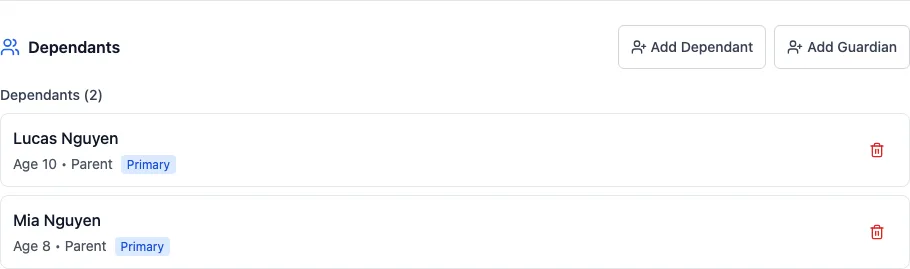
Linking a child to a parent
You do this from the parent's profile.
Open the parent's profile
Sidebar Members → click the parent. Stay on the Profile tab and scroll down to the relationships section.
Click Add Dependant
The Add Dependant window opens.
Find or create the child
With Search Existing, type the child's name or email and pick them. Or click Create New and enter their first name, last name, date of birth and phone (email is optional).
Choose the relationship and save
Pick the Relationship (Parent, Legal Guardian, Grandparent or Other) and click Add Dependant. The link is made straight away.
Adding a second guardian
On the profile of a guardian who already has children, Add Guardian adds another guardian for all of those children. The new guardian is sent an invitation and is linked once they accept it.
Click Add Guardian
On the first guardian's profile, click Add Guardian.
Find or create the guardian
Search Existing finds someone already at your club (they need an email address). Create New asks for their name, date of birth, email and phone, and whether they're Guardian only or an Active guardian who also trains.
Set the relationship
Pick the Relationship, tick Set as primary guardian if they should be the main contact, and click Add Guardian.
They accept the invitation
They get an email with a Guardian Invitation link, which lasts 7 days. When they click Accept, they're linked to the children. They can also Decline.
Changing the primary guardian, or removing a link
- On a child's profile, each guardian has a star button (Set as primary guardian). The primary guardian is highlighted in yellow.
- The bin button removes the link. You're asked to confirm, with a warning if it's the child's last guardian. Removing a link doesn't delete either member.
Owners, managers and coaches can add guardians and dependants and change the primary guardian. Only owners and managers see the bin button to remove a link.
What guardians do themselves
Once a guardian has a login, they look after their family from My Account (in the menu under their name):
- My Dependants: add a child, edit their details, and open each child's page (Overview, Grades, Attendance, Medical, Achievements, Settings).
- Co-Guardians: Invite another parent by email, sharing all their children or only some.
- A child's Settings tab has Create Login for …, so an older child can log in with their own email and password.
They can also register their children through your public registration form. For the guardian's side in more detail, see Dependants in the member portal.