Adding Members
Add a new member yourself with the registration wizard, or import many from a spreadsheet.
When someone joins at the dojo, you can add them yourself. The registration wizard asks who you're registering, then only shows the steps that type of member needs: details, emergency contact, medical info, waiver, insurance and a plan.
Anyone on your staff can do this, including coaches and front-desk accounts, for every type of member below. If you'd rather people sign themselves up, share your online form instead: see Public registration.
Adding a member
Open the wizard
In the sidebar, open Members and click Add Member (top right). The same button is on the Registration page.
Choose who you're registering
The first screen asks Who are you registering? Click one of the cards below. The wizard moves on by itself.
Fill in each step
The steps show across the top. Each step has its own button to carry on, and Previous takes you back. Email is needed for anyone who gets a login (adults and guardians); for a junior, the guardian's email is enough.
Sign the waiver
On Digital Waiver, the member (or their guardian) signs your default waiver on the screen. You need a default waiver template first: see Waiver templates.
Pick a plan and finish
On Payment, choose a membership plan if they're starting one. Then either take payment (Register & Pay), email them a bill (Send Invoice), or finish without paying now (Skip for Now). With no plan or a free one, the button reads Register (Free).
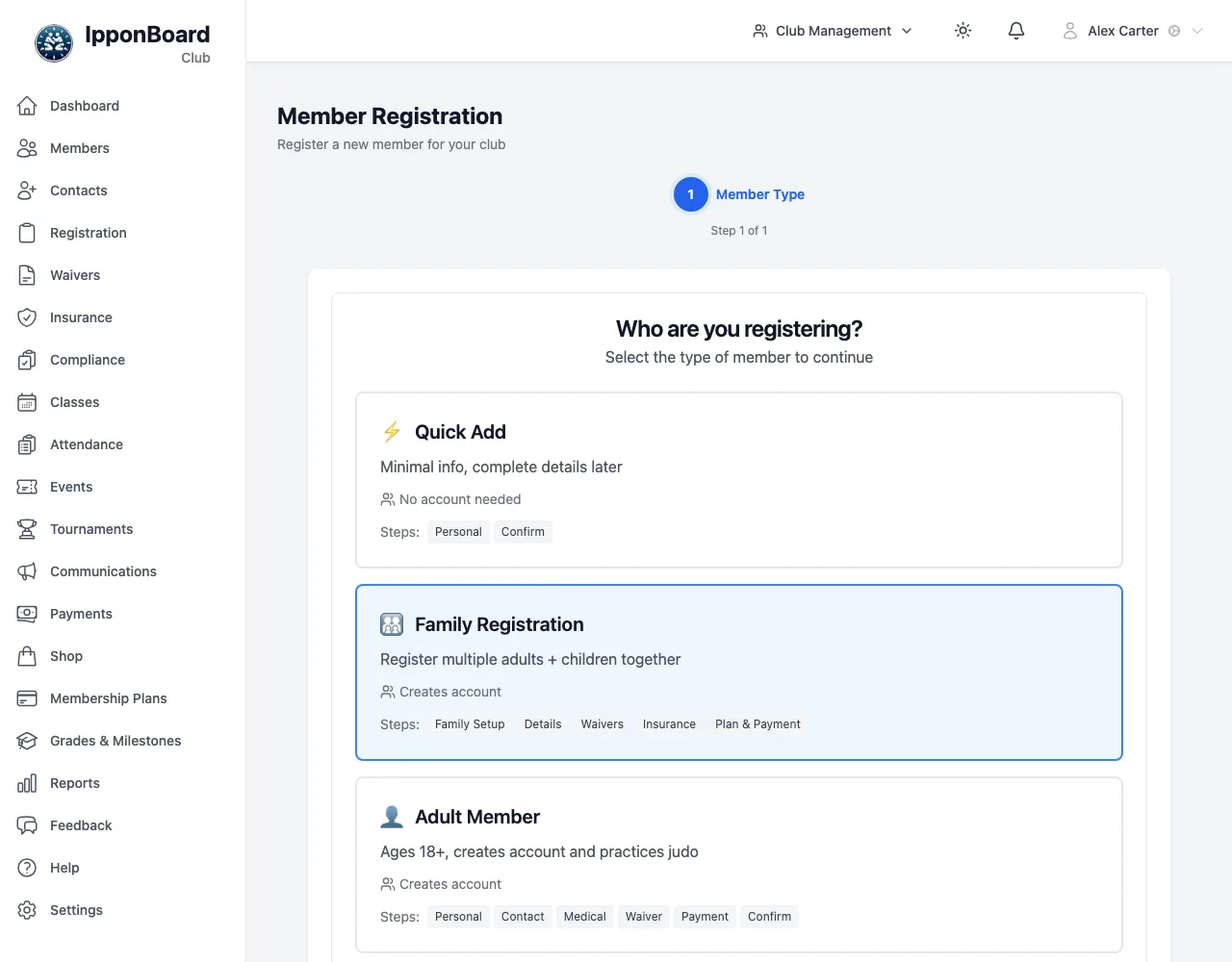
Which type to choose
| Card | Use it for | Steps |
|---|---|---|
| Quick Add | Getting someone on the mat now; fill in the rest later. No login. | Personal Info, Digital Waiver (can be skipped) |
| Family Registration | Several adults and children in one go. | Family Setup, Details, Waivers, Insurance, Plan & Payment |
| Adult Member | An adult who trains. Creates a login. | Personal Info, Contact & Emergency, Medical Info, Digital Waiver, Insurance, Payment |
| Junior Member | A child under your adult age. Linked to a guardian; no login of their own. | Personal Info, Guardian, Contact & Emergency, Medical Info, Digital Waiver, Insurance, Payment |
| Guardian Only | A parent who doesn't train. Creates a login. | Personal Info, Contact & Emergency, Link Children |
| Drop-in Guest | A one-off visitor. No login. | Personal Info, Digital Waiver |
The Insurance step only appears if your club has insurance types set up.
Import members from a spreadsheet
Moving from another system or a spreadsheet? Owners and managers can bring everyone in at once. Nobody is emailed: each member can activate their own account later via email or your public sign-up link.
Open Import members
Sidebar Members → Import members (next to Add Member). You can also do it in the club wizard's last step.
Fill in the template
Click Download the template. Its columns are first_name, last_name (or one name column), email, phone, belt and date_of_birth; only a name is required. Save it as CSV.
Upload it
Choose the file and click Import. You see how many were imported, how many were skipped because they're already in the club (the same email), and any row that couldn't be imported, with the reason.
After you finish
The wizard shows a Registration Summary and what happens next:
- For members who get a login (Adult Member, Guardian Only, and a new guardian added for a junior), an email goes out with a link to set their own password or passkey. No password is ever sent in the email.
- Quick Add, Junior and Drop-in members get no email. You can turn on a login later from their profile with Enable Login: see Member profiles.
Click Return to Member Management to go back to the list. After a family registration you'll see each new member with a View Profile button.