Connecting Square
Connect your club's Square account for online card payments and Square Terminal, or use Square POS on an iPad or iPhone.
Square can do three things for your club. Each one is on the Payment Providers page (sidebar Settings → tab Payment Provider):
- Square Online: card payments online, instead of Stripe. Needs your Square account connected.
- Square Terminal: send payments to a Square Terminal at the front desk. Needs your Square account connected. See Square Terminal.
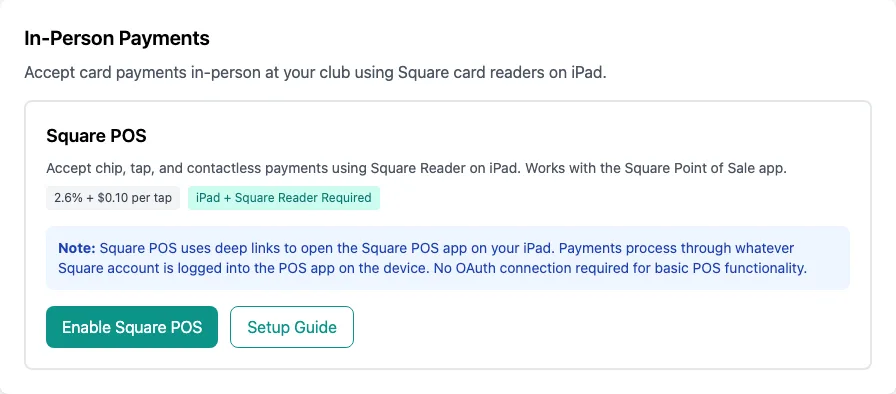
- Square POS: take the card with the Square Point of Sale app and a Square Reader on an iPad or iPhone. This one doesn't need the connection below.
Owner only
Connect your Square account
Open Payment Provider
In the sidebar, click Settings, then the Payment Provider tab.
Click Connect Square Account
Under Online Payments, on the Square Online card, click Connect Square Account.
Sign in to Square and allow access
You go to Square's own website. Sign in to your Square account (or create one), and allow IpponBoard to take payments for you.
Back on Payment Providers
Square sends you back to the Payment Providers page. The Square Online card shows Connected, with Charges Enabled and the Environment below it. If your Square account has more than one location, payments go to its first location.
Use Square for online payments (optional)
To take online card payments through Square instead of Stripe, click Enable for Online Payments. This turns Stripe off for online payments. To keep Stripe for online payments and use Square only at the front desk, skip this step and go to Square Terminal.
Square POS (Square Reader on an iPad or iPhone)
With Square POS, staff take the payment in IpponBoard and the card in the Square Point of Sale app. The payment goes to whichever Square account is signed in to that app.
Set up the iPad or iPhone
Install Square's Point of Sale app, sign in to your Square account in it, and pair your Square Reader with it.
Turn on Square POS
On Payment Providers, under In-Person Payments, click Enable Square POS. The card shows ✓ Square POS Enabled.
Take a payment
On the same iPad or iPhone, open IpponBoard and go through Process Payment. At How are they paying?, tap Card on Square app (a big button when you have no Square Terminal, otherwise under More ways to pay), then Pay with Square POS. The Square app opens with the amount; take the card there.
Back to IpponBoard
When the card goes through, Square brings you back and the payment is recorded. If the Square app didn't open, tap Re-open Square POS App, or Cancel and go back to choose another payment method.
Disconnect Square
On the Square Online card, click Disconnect, then Disconnect again to confirm. This also turns off Square Online, Square Terminal and Square POS. Your Square account itself is not touched.