Square Terminal
Pair a Square Terminal with your club, then send payments to it from Process Payment.
A Square Terminal is Square's card machine with its own screen. Staff set up the payment in IpponBoard and send it to the terminal; the member taps or inserts their card there, and the payment is recorded against them.
Before you start
Turn on Square Terminal and pair a terminal
Open Payment Provider
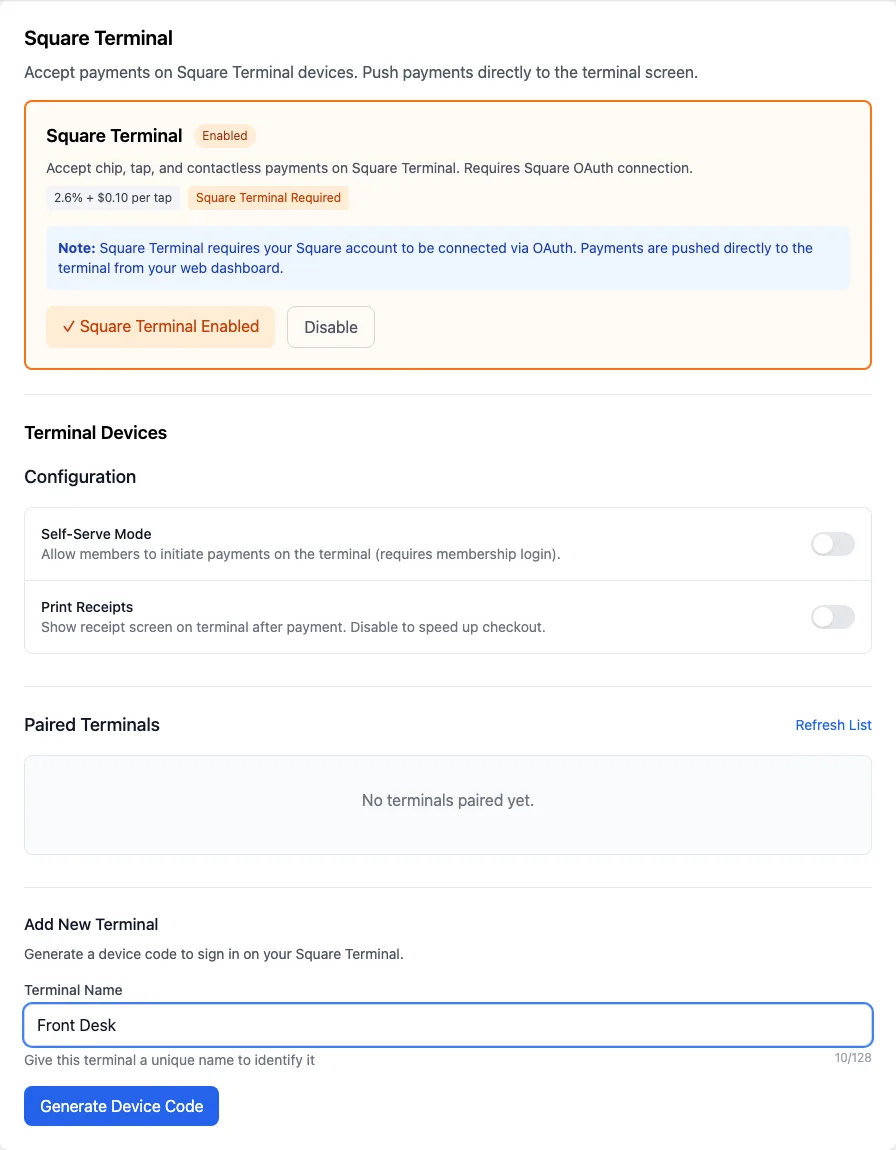
In the sidebar, click Settings, then the Payment Provider tab. Scroll down to Square Terminal.
Click Enable Square Terminal
The card shows ✓ Square Terminal Enabled, and Terminal Devices appears below it. (If you see Connect Square Online account above, connect Square first.)
Name the terminal and get a code
Under Add New Terminal, type a Terminal Name, for example "Front Desk", then click Generate Device Code. A Device Code appears, with the time it expires.
Sign in on the terminal with the code
On the Square Terminal, choose to sign in with a device code and type the code before it expires.
Check it's paired
Back in IpponBoard, click Refresh List. The terminal shows under Paired Terminals with its name. To add another terminal, click Done / Generate Another.
Terminal settings
- Self-Serve Mode: lets members start a payment on a terminal themselves (they need to be signed in to their member account).
- Print Receipts: shows the receipt screen on the terminal after a payment. Turn it off for a faster checkout.
Take a payment on the terminal
Start a payment
Go to sidebar Payments → Process Payment, pick the member and add the items. See Processing payments.
Tap Card on terminal
At How are they paying?, tap Card on terminal. It goes straight to the terminal screen; nothing is charged yet.
Send it to the terminal
Pick the terminal (if you have only one, it's already picked) and click Send to terminal ($45.00) (it shows the amount). The amount appears on the terminal.
The member pays
IpponBoard shows Waiting for Payment while the member pays on the terminal. When it goes through, the payment is recorded. Cancel Transaction stops it.
If it fails
You see Payment Failed or Payment Cancelled: click Retry, or Close to choose another way to pay. If IpponBoard says the terminal is busy, click Is terminal stuck? Force clear and retry.