Refunds
Refund a card payment back to the member's card.
You can refund a completed card payment taken through Stripe or Square. The whole amount goes back to the card it was paid with.
Owner or Manager
Refund a payment
Find the payment
In the sidebar, click Payments. Find the payment (the filters help), then click it. Or click its ⋯ menu and choose Process Refund, which opens the same page.
Click Process Refund
At the top of the payment's page, click Process Refund. It's there only for a Completed payment taken through Stripe or Square, and only for an Owner or a Manager.
Give a reason
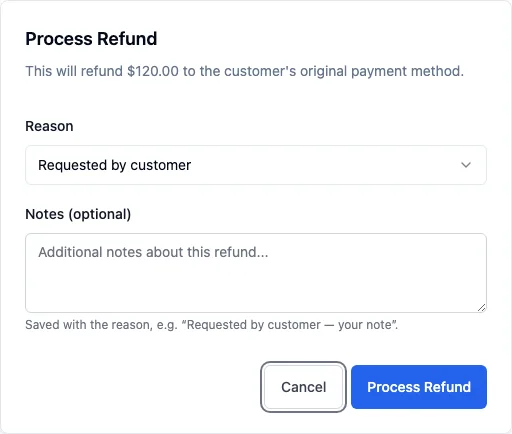
The Process Refund box shows the amount to be refunded. Choose a Reason (Requested by customer, Duplicate payment or Fraudulent) and add any Notes (optional). Both are kept: the payment's history shows the reason followed by your note.
Confirm
Click Process Refund. IpponBoard sends the refund to Stripe or Square, and the payment's status changes to Refunded. Under History, the payment shows when it was refunded, by whom, and the reason.
Good to know
- Whole amount only. A refund in IpponBoard returns the full payment. For a part refund, do it in your Stripe or Square account.
- Cash, cheque and bank transfer: give it back, then record it. Payments recorded as cash, cheque or bank transfer didn't go through a card provider, so IpponBoard can't send the money back. Give it back to the person yourself, then open the payment and click Record Refund (same reason and notes box). The payment is marked Refunded, saved as “Given back by hand (Cash)” with your reason, and no longer counts as revenue. Nothing is sent anywhere.
- A Square POS payment still waiting to be confirmed can't be refunded yet: wait until it's complete, or refund it in Square.
- A refund doesn't cancel a membership. If the member is leaving, end their plan as well: see Membership plans.
- Fees and timing are set by Stripe or Square, including whether their fee comes back to you and how long the money takes to reach the member's card.