Processing Payments
Take a payment at the front desk: pick the member, add what they're paying for, choose how they pay.
Use Process Payment whenever someone pays at the club: a membership, insurance, something from the shop, an event, or any other amount. Pick the member, tap what they're paying for, then Pay now and how they pay. For the everyday jobs at the desk in three steps each, see Running the front desk.
Take a payment
Open Process Payment
In the sidebar, click Payments, then Process Payment at the top right.
Select Member
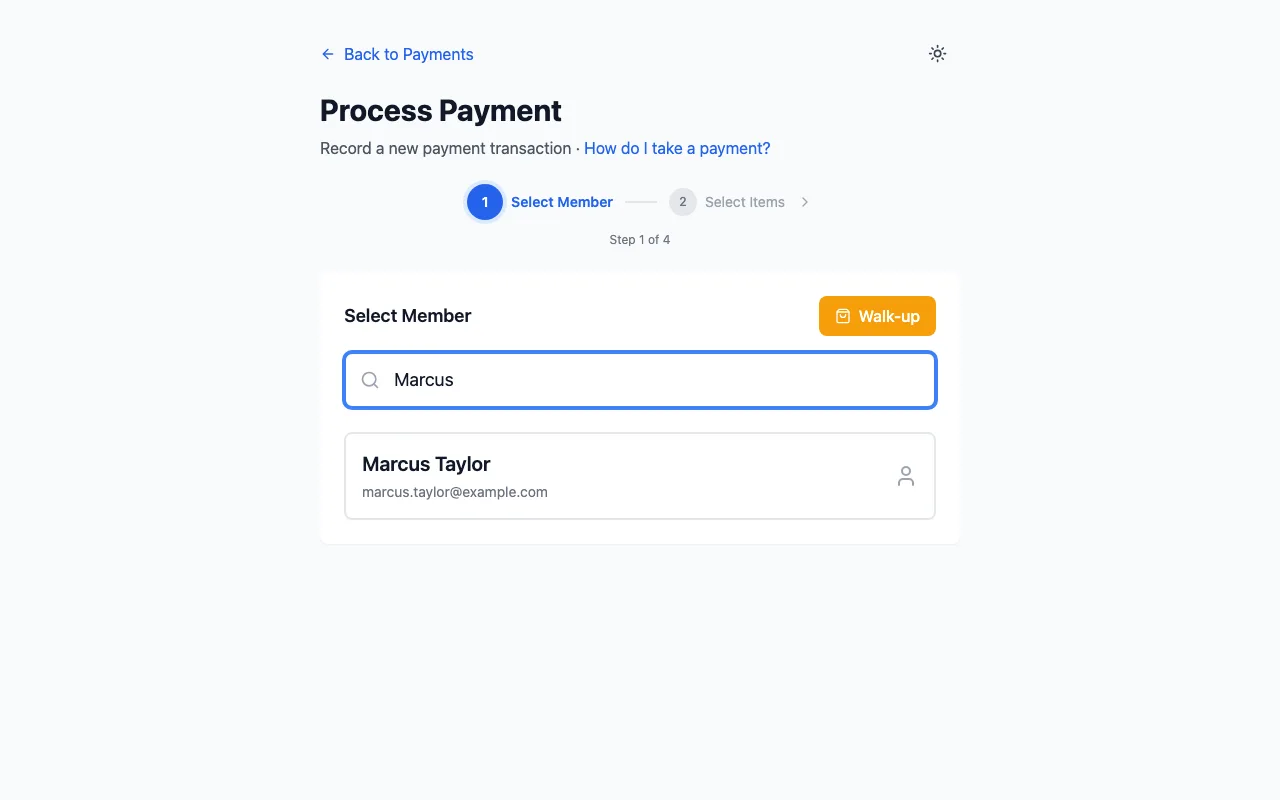
Type in Search member name or number... and click the member. For someone who isn't a member (a visitor buying a gi, say), click Walk-up instead.
What are they paying for?
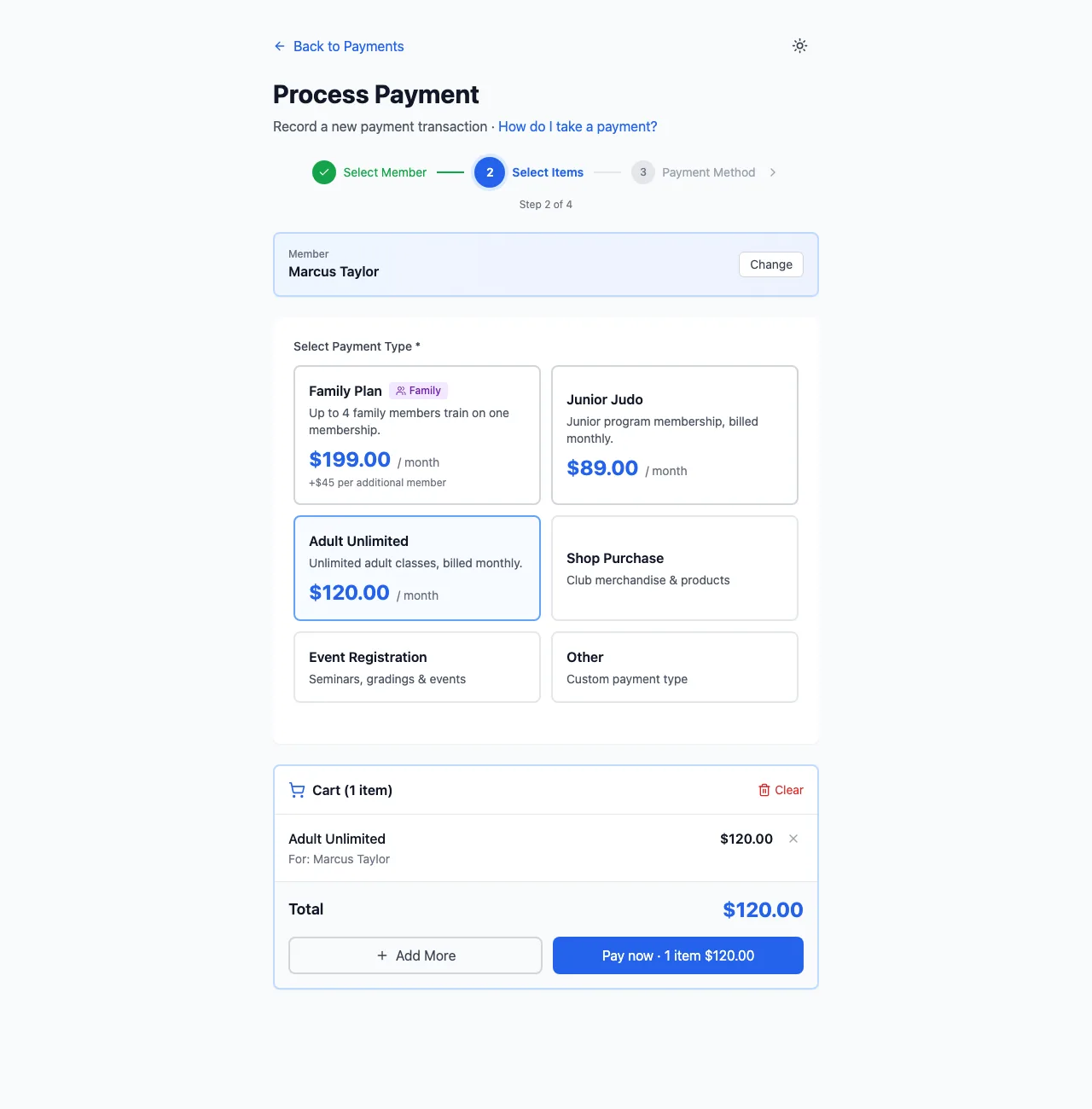
Under Select Payment Type, click what they're paying for:
- a membership plan or an insurance type (each has its own card);
- Shop Purchase: pick products from your shop;
- Event Registration: pick an event;
- Other: type an Amount and a Description.
Where a box asks (Who is this for? on a family account, or Other), click Pay now → to go straight to paying, or Add to cart to add something else first. Anything else goes straight into the cart below, whose button reads Pay now · 2 items $165.00: it pays the whole cart.
How are they paying?
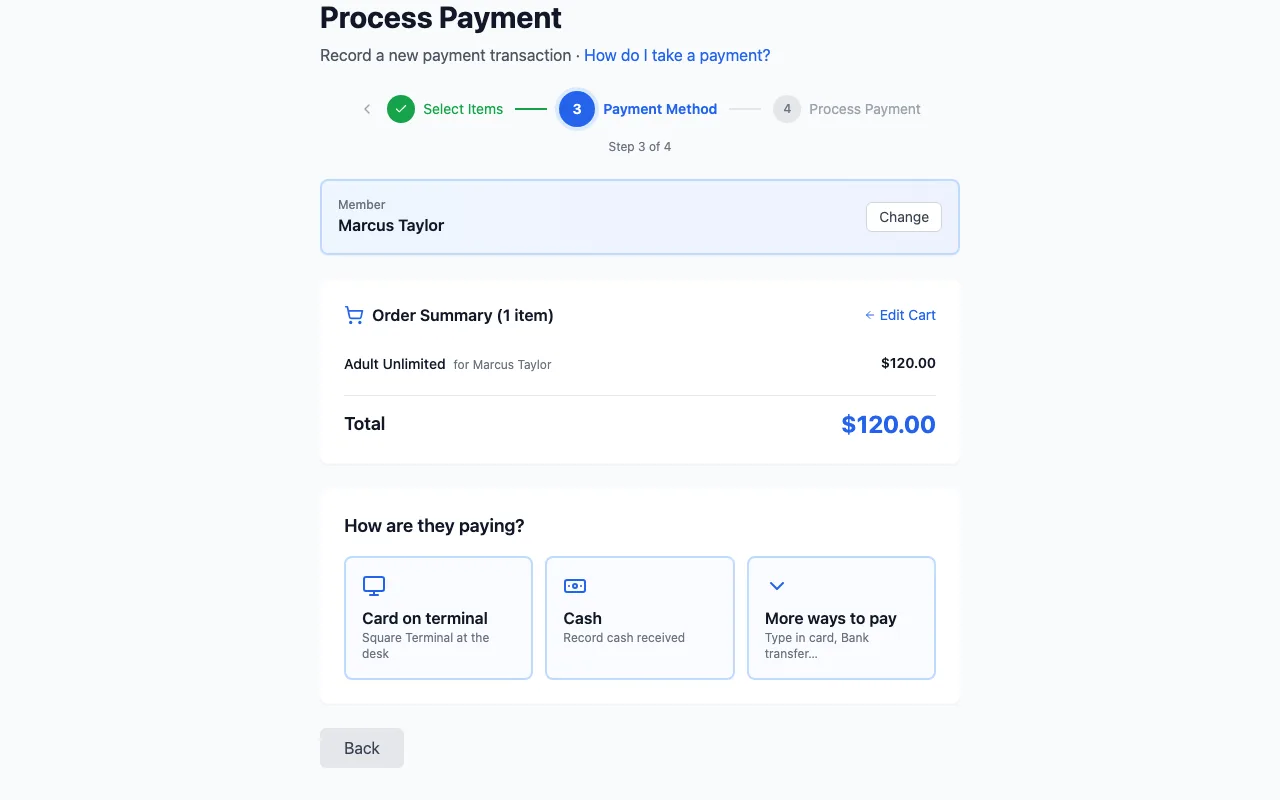
Check the Order Summary (Edit Cart goes back), then tap how they pay. It goes straight to that method, and nothing is charged until its last button. The big tiles are the usual ways (Card on terminal and Cash, with Charge Visa ••4242 first for a member with a saved card); the last tile, More ways to pay, opens the rest. You only see the ones your club has set up:
- Cash, Bank transfer, Cheque: money you've already received.
- Charge Visa ••4242: the card the member saved (first, when they have one).
- Card on terminal: send it to your Square Terminal. See Square Terminal.
- Type in card: type the card details here (through Stripe, or Square if that's your online provider).
- Card on Square app (Square POS): take the card in the Square app, on an iPhone or iPad with the Square app. It only shows there (on a computer it's under More, switched off); with no Square Terminal it's a big button. See Square POS.
- Card on another machine: a card taken on a machine that isn't connected to IpponBoard.
- Split (part cash, part card): see Split a payment.
- Email a pay link: email the member an invoice with a link to pay.
Finish it
The last button says the amount and what happens:
- Cash, bank transfer, cheque: check the Date (and a Reference Number for a cheque or transfer), then Record $120.00 cash.
- Saved card: Charge $45.00 to Visa ••4242.
- Card on terminal: pick the terminal and Send to terminal ($45.00).
- Type in card: enter the card under Payment Details and click Pay (it shows the amount).
- Email a pay link: check the Send to email, set a Due date (optional), and click Email pay link ($45.00). Plans and insurance start when the member pays.
You see Payment Recorded! (or Invoice Sent!) and go back to the Payments list. If the money came in but a plan or insurance couldn't be set up, it says Payment collected — action required: open the payment with View payment details → and sort it out there.
No card options?
Choose your big buttons
Split a payment
When someone pays part one way and part another (say $50 in cash and the rest by card or bank transfer), record it as one split payment. Only staff can split a payment; members paying for themselves pay one way.
Tap Split
Take the payment as above. At How are they paying?, tap Split (part cash, part card) (behind the More ways to pay tile, unless your club made it a big button).
The first part
Under First part: how are they paying?, tap a method, then type How much? or tap Half, $10, $20 or $50, and click Next.
The rest
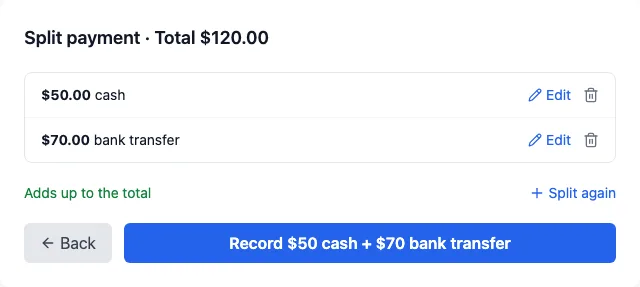
Under Remaining …: how are they paying the rest?, tap a method: it takes what's left. Each part has Edit and a bin to remove it; changing one part's amount moves the other with it. For a third part, click Split again. Only one part can be a card.
One button
The button says exactly what happens. With no card part: Record $50 cash + $70 bank transfer. With a card part, the money in hand comes first: I've got the $22.50 cash: take $27.50 on terminal, or Bank transfer of $20 received: …. Collect the cash first: the card part is taken first, and if it's declined nothing is recorded, so hand the cash back. When it's done, each part shows with a tick: Card $27.50 approved ✓ · Cash $22.50 recorded ✓.
Afterwards
- Each part is its own payment in the Payments list, labelled with the whole split (for example Split: $50 cash + $70 bank transfer). The plan or items are set up once, not once per part.
- A part's page has a Split payment box listing every part. To refund, refund each part on its own page.
- The receipt lists each part on its own line.
Events and tournaments
An event registration (Split Payment) and the tournament desk (Split payment) split what's due into cash and bank transfer parts only, no card. Leave the last amount blank for the rest, then Record split payment.
Automatic payments
Members with a saved card can pay for their plan automatically. You can see each member's plans, and whether they pay automatically, in sidebar Membership Plans → View All Subscriptions.
If an automatic payment fails, the member gets an email, IpponBoard tries again, and after repeated failures the subscription shows as past due. What happens when a member with an overdue payment checks in (a warning, a grace period, or a block) is up to you: sidebar Settings → tab Attendance & Reminders.
Finding a payment later
The Payments list
Sidebar Payments shows every payment. Filter by status, type (for example membership, insurance, event or shop), provider (Stripe, Square, Manual Entry) and date range. Click a payment to open it, or use its ⋯ menu: View Details, Download Receipt, Process Refund, or Cancel Payment for one that's still pending.
A payment's page
It shows the Payment Summary, what was bought, the member, the History, and under Actions: Download Receipt, Send Receipt and View Member Profile. A pending payment can be edited, cancelled or marked as completed.
A member's payments
Open the member's profile and click the Payments tab. See Member profiles.
Reports
Sidebar Reports → tab Financial has revenue and payment breakdowns you can export. See Financial reports.