Connecting Stripe
Take card payments online by connecting your club's Stripe account.
Connect your club's Stripe account and members can pay by card online, and staff can take card payments in Process Payment. The money goes to your Stripe account, then to your bank. You don't need any API keys: Stripe asks you to sign in and agree, and that's it.
Owner only
Connect Stripe
Open Payment Provider
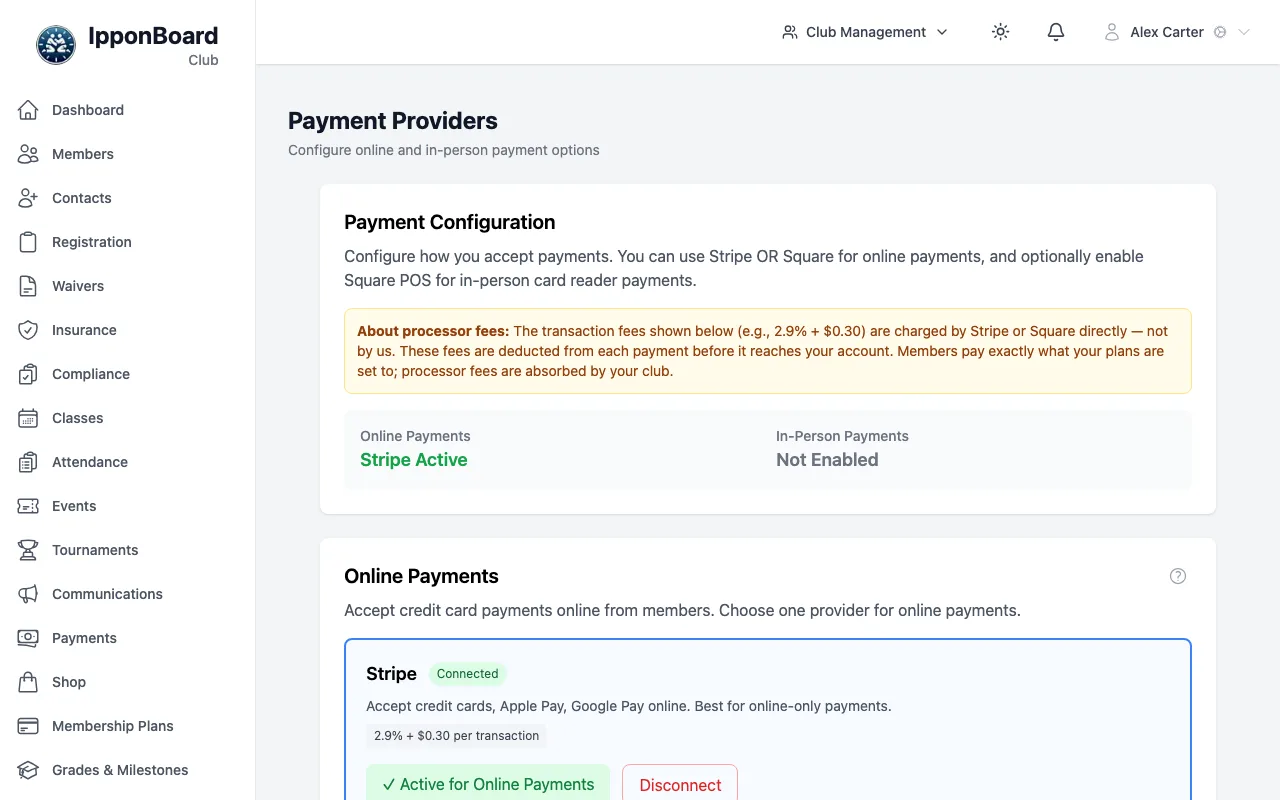
In the sidebar, click Settings, then the Payment Provider tab. The Payment Providers page opens.
Click Connect Stripe Account
Under Online Payments, on the Stripe card, click Connect Stripe Account. (How Does This Work? shows a short summary first.)
Sign in to Stripe and agree
You go to Stripe's own website. Sign in to your Stripe account, or create one there: the club's name and email are filled in for you. Then agree to connect it to IpponBoard.
Back on Payment Providers
Stripe sends you back to the Payment Providers page. The Stripe card shows Connected, or Pending Setup if Stripe still needs details from you (for example your bank account or ID). Below it, Charges Enabled and Payouts Enabled show what Stripe has switched on.
Connecting turns Stripe on for online payments; there's no separate step. Once Stripe has switched on charges, the card shows ✓ Active for Online Payments and the summary at the top of the page reads Stripe Active. Stripe is then used for card payments online and for Type in card in Process Payment.
If it says Pending Setup, the card tells you what's left: finish the steps Stripe asks for in your Stripe account. Online payments start by themselves as soon as Stripe approves the account.
If Square is already your online payment provider, connecting Stripe doesn't switch you over: click Enable for Online Payments on the Stripe card when you want to.
Stripe or Square online, not both
Disconnect Stripe
On the Stripe card, click Disconnect, then Disconnect again to confirm. Card payments through Stripe stop straight away. Your Stripe account itself, and the money in it, are not touched. You can connect again at any time.