Event reports
Participant lists, sessions, money and attendance for one event, as CSV or PDF.
Who can use it: Coaches and above for participant, session and attendance reports; owners and managers for the financial, custom questions and full reports.
1
Open Event Reports
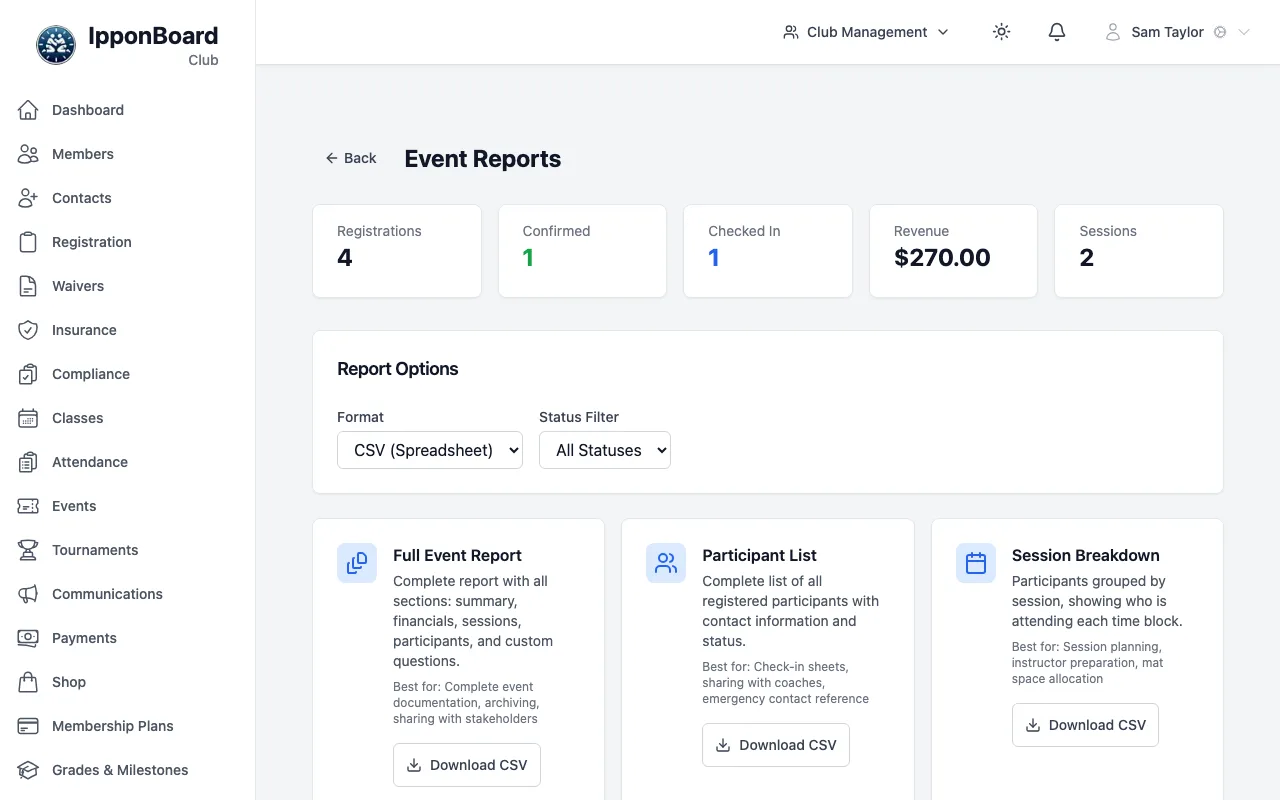
On the event, click Reports in Quick Actions. The top shows registrations, confirmed, checked in, revenue and sessions.
app.ipponboard.com
2
Choose the format and filter
Under Report Options, pick CSV (Spreadsheet) or PDF (Document), and a Status Filter if you only want, say, confirmed registrations.
3
Download
Click Download CSV (or Download PDF) on the report you want.
The reports
- Full Event Report: Everything in one file: summary, participants, sessions, money and answers.
- Participant List: Everyone registered, with contact details, status, payment, price and sessions.
- Session Breakdown: Who is in each session.
- Financial Summary: Each payment, with totals collected and refunded.
- Attendance Report: Who checked in and who didn’t.
- Custom Questions: Answers to the extra questions you added to the registration form.
The buttons are greyed out until someone has registered. For a quick list, the registrations page also has Export CSV.