Waiver Enforcement
Decide whether a missing or expired waiver stops someone checking in, or only shows a warning.
Who can use it: Owners and managers (in Settings).
1
Open the check-in settings
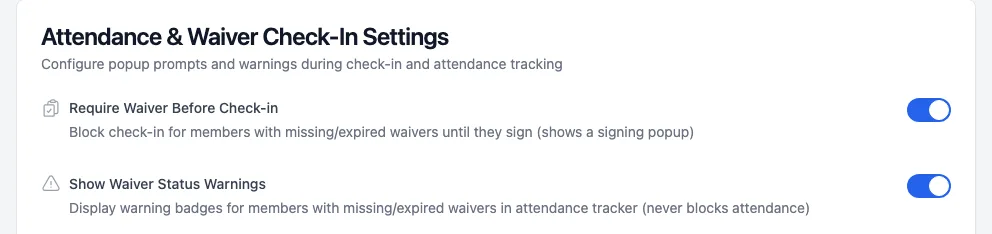
Go to Settings and open Attendance & Reminders. The waiver switches are at the top of Attendance & Waiver Check-In Settings.
app.ipponboard.com
2
Choose block or warn
- Require Waiver Before Check-in on: members with a missing or expired waiver can't check in until they sign.
- Require off and Show Waiver Status Warnings on: they check in as normal and staff see a warning badge. This never blocks anyone.
- Both off: waivers aren't checked at check-in.
3
Drop-ins (optional)
Further down, under Drop-in Management, Require Waiver for Drop-ins makes first-time visitors sign before they can be checked in as a drop-in.
What happens at check-in
- At the kiosk and when scanning a class QR code, a member without a current waiver sees Waiver Required ("cannot check in until the waiver is signed"). Sign Waiver Now lets them sign on the spot, and then they're checked in.
- Only the Default template counts. If the club has no active default template, nobody is blocked.
- A child's waiver is signed by their guardian, and the signed copy records that.
Before you turn on the block, send everyone a link with Send to All Missing on Waivers Overview, and give people a few days to sign. See Requesting signatures.