Membership Reports
Who your members are: by status, role, plan, belt and age, and how numbers are moving.
Go to Reports and open the Membership tab. The period at the top right (Last 3 months to Last 2 years, or Custom) sets what counts as new.
Who can use it: Owners and managers.
app.ipponboard.com
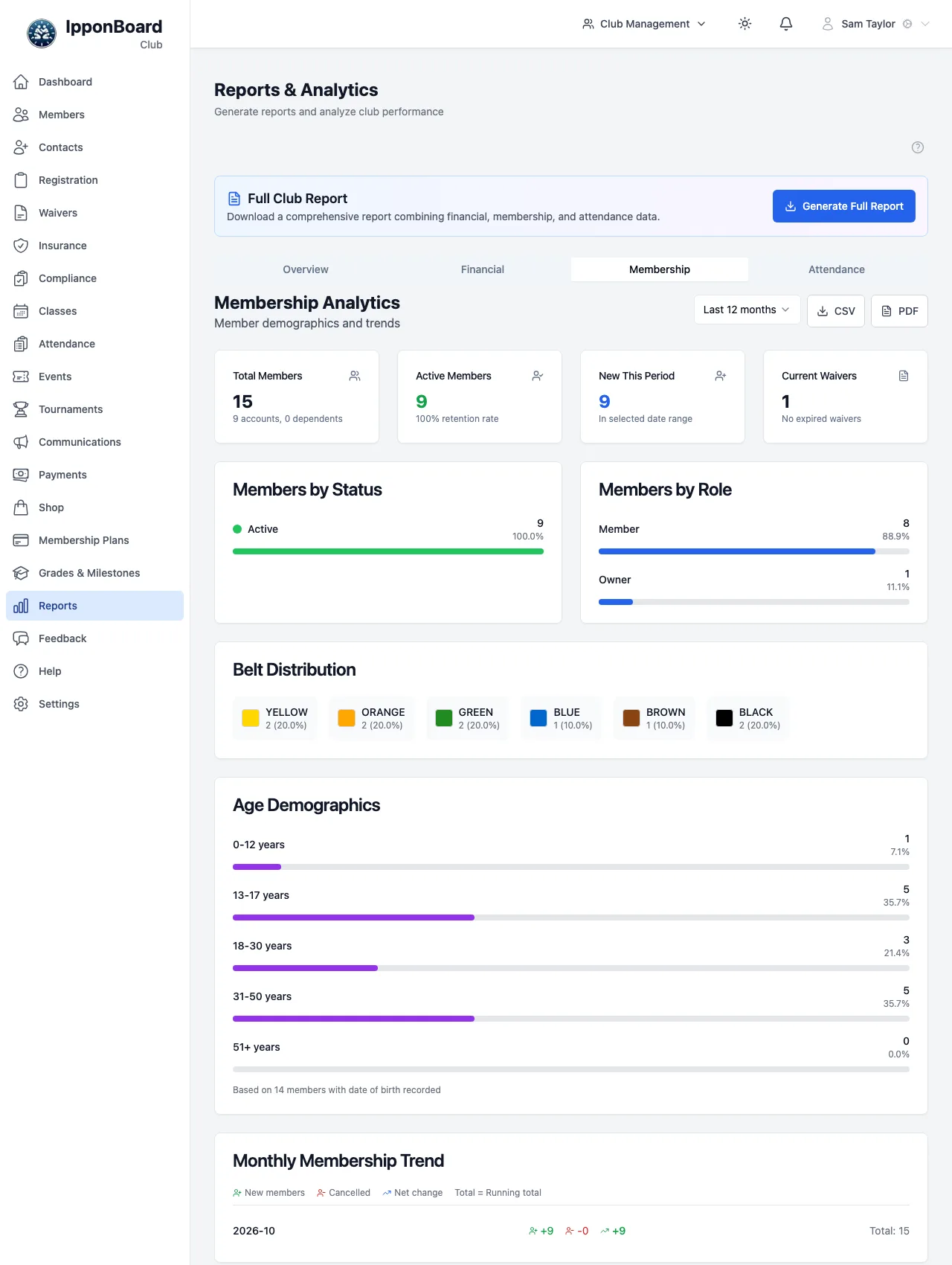
What's on the tab
- Total Members: everyone on your member list, plus staff who have a login but no member record. Underneath, accounts is how many people have a login with the club and dependents is how many members have a guardian on record (children and other dependants).
- Active Members, with a retention rate: active members as a share of all members who aren't pending.
- New This Period: members who joined in the chosen period.
- Current Waivers: signed waivers still in date, and how many have expired.
- Members by Status and Members by Role.
- Subscription Status and Active by Plan, once members are on plans.
- Belt Distribution: how many members hold each belt.
- Age Demographics: 0–12, 13–17, 18–30, 31–50 and 51+, counting only members with a date of birth.
- Monthly Membership Trend: new, cancelled, net change and running total for each month.
Downloading
- CSV: a member list with member number, name, email, phone, role, status, joined date and belt.
- PDF: a formatted membership report.