Signing a Waiver
Sign your club's waiver for yourself or for a child, on your phone.
Tap Sign Now
On Waivers, beside the waiver marked (Signature Required), or Sign Again beside an expired one. The dashboard's Fix → opens the signing page straight away (or the Waivers page, if several children need one).
Check who you're signing for
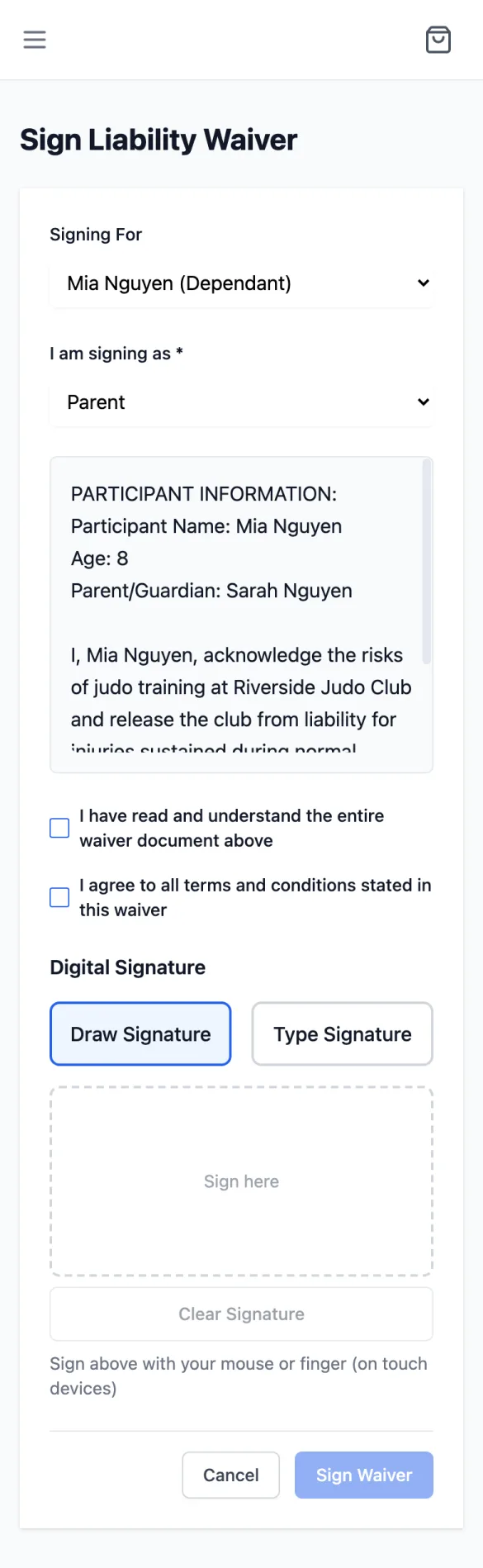
The page is Sign Liability Waiver. If you have children, Signing For lets you choose Myself or a child; for a child, also choose I am signing as Parent or Guardian. Sign Now beside a child opens the page already set to that child; change Signing For to sign for someone else.
Read it and tick both boxes
Scroll through the waiver text. It's filled in for the person you're signing for: their name and, for a child, their age and your name as parent or guardian. Then tick I have read and understand the entire waiver document above and I agree to all terms and conditions stated in this waiver.
Sign
Under Digital Signature, Draw Signature with your finger in the box (Clear Signature to start again), or Type Signature and type your full name exactly as shown under Please type exactly:. Signing for a child, you type your own name, not theirs. Which options you get depends on your club.
Tap Sign Waiver
You'll see Waiver signed successfully and go back to your waivers, where it now shows Active. Your record keeps exactly the text you read. If the club changes the waiver while you're signing, you'll see The waiver changed while you were signing and the new text: read it, tick the boxes again and sign.