Your Plan
See your plan's status and renewal date, turn auto-pay on or off, cancel or renew, and manage family members.
Where your plan shows
On Membership Plans, each plan you or a child hold has a row: the status, who it's for (You or the child's name), classes left on a class-limited plan, and Renews or Expires with a date. The statuses are Active, Purchased (a one-off purchase), Past Due, Cancelling, Cancelled and Expired. The dashboard also shows Classes Remaining for a class-limited plan.
Manage Subscription
Tap the row (it has a gear icon). Manage Subscription shows the plan, who it's for, its Status, when it Started, Next Billing, and Auto-pay.
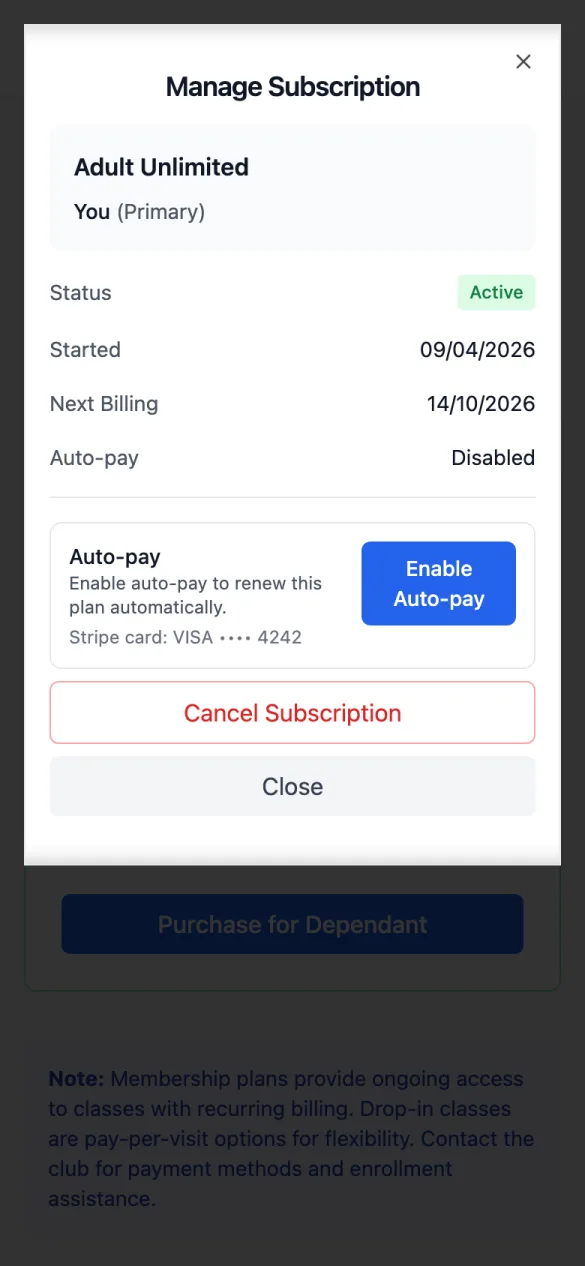
- Enable Auto-pay / Disable Auto-pay: renew with your saved card each period. With no card saved, you're asked to Save Card first.
- Cancel Subscription → Yes, Cancel: the plan keeps working to the end of the period you've paid for, then stops. Until then it shows Cancelling and you can Undo Cancellation.
- Renew Now: for a plan that's Past Due, Expired or Cancelled. It renews the plan for whoever it was for, so on a child's plan the checkout is for that child, not you.
- A one-off purchase has no settings: "Contact the club for assistance with changes."
Family plans
On a family plan, Manage Family Members adds or removes people. Adding someone takes you to checkout for the extra; removing people asks Remove Family Members? (the club can't refund for removed members). You can add yourself, your children and your children's other parent or guardian, and you can join a family plan that you, one of them or your own parent holds. To add anyone else, ask the club.